Essay · October 24, 2026
PostgreSQL Tuples: What Really Happens to a Row
Notes on how PostgreSQL stores row versions, what ctid, xmin and xmax tell us, and how VACUUM cleans up after them.
1. The problem
Two transactions often need the same row at the same time. One is updating it, the other is reading it. If the reader had to wait for the writer, every busy table would turn into a queue.
PostgreSQL avoids this by never changing a row in place. An UPDATE writes a new copy and marks the old one as expired. Readers keep using the old copy until the writer commits. This is MVCC (Multi-Version Concurrency Control), and everything else in this post follows from that one decision.
So a row and a tuple are not the same thing. A row is the logical record we query: the account with id 1. A tuple is one physical version of that row on a disk page. One row can have many tuples over its lifetime.
2. The hidden columns
Every tuple has a header with a few system columns. SELECT * doesn’t return them, but we can ask for them by name.
- ctid: where the tuple lives, as
(page, slot). A new version means a new ctid. - xmin: the transaction that inserted this version.
- xmax: the transaction that deleted or replaced it.
0means nobody has, so it’s still live.
To see this in action, I created a small table with three accounts:
CREATE TABLE accounts (
  id      int PRIMARY KEY,
  name    text,
  balance int
);

INSERT INTO accounts VALUES
  (1, 'account1', 100),
  (2, 'account2', 200),
  (3, 'account3', 300);

SELECT ctid, xmin, xmax, * FROM accounts;
ctid | xmin | xmax | id | name | balance
-------+------+------+----+----------+---------
(0,1) | 750 | 0 | 1 | account1 | 100
(0,2) | 750 | 0 | 2 | account2 | 200
(0,3) | 750 | 0 | 3 | account3 | 300All three tuples sit on page 0 in slots 1 to 3. Transaction 750 created them, and xmax = 0 says nothing has touched them since. Your transaction IDs will be different. SELECT pg_current_xact_id(); shows the current one (txid_current() before PostgreSQL 13).
3. What happens inside a transaction
Now let’s open two psql sessions, A and B, and watch these columns change.
UPDATE
-- Session A
BEGIN;
SELECT pg_current_xact_id();   -- 751
UPDATE accounts SET balance = 150 WHERE id = 1;
SELECT ctid, xmin, xmax, * FROM accounts WHERE id = 1;
ctid | xmin | xmax | id | name | balance
-------+------+------+----+----------+---------
(0,4) | 751 | 0 | 1 | account1 | 150Session A already sees a new tuple at (0,4), created by its own transaction 751. Before A commits, let’s run the same query from session B:
 ctid  | xmin | xmax | id |   name   | balance
-------+------+------+----+----------+---------
 (0,1) |  750 |  751 |  1 | account1 |     100
B still sees the old tuple at (0,1) with balance 100. Its xmax is now 751, but 751 hasn’t committed yet, so for B the tuple is still alive. Both versions are on the page at the same time.
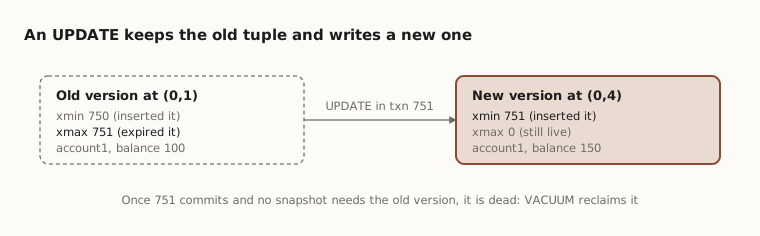
When A commits, B’s next query switches to (0,4). The tuple at (0,1) is now dead. No transaction will ever see it again, but it still takes up space on the page.
If the update doesn’t touch an indexed column and the page has free space, PostgreSQL does a HOT update (Heap-Only Tuple). The new version goes on the same page and the indexes aren’t touched, which makes the update much cheaper.
DELETE
BEGIN;                                  -- txn 752
DELETE FROM accounts WHERE id = 2;
COMMIT;
Nothing is erased. PostgreSQL sets xmax = 752 on account2’s tuple at (0,2). Once 752 commits, every new snapshot treats it as gone, but the bytes stay on the page.
ROLLBACK
BEGIN;                                  -- txn 753
INSERT INTO accounts VALUES (4, 'account4', 400);
ROLLBACK;
Rollback doesn’t go back and remove account4’s tuple. It only records in the commit log (pg_xact) that 753 aborted. Any tuple with xmin = 753 is now invisible forever, which makes it one more dead tuple. That is why rollback is cheap in PostgreSQL: there is no undo work.
The same applies to a rolled-back UPDATE or DELETE. The old tuple keeps an xmax that points to an aborted transaction, and readers ignore it.
After these three transactions, the table has 2 live rows and 3 dead tuples: the old account1, the deleted account2 and the aborted account4.
4. Who sees what
When a query starts, PostgreSQL takes a snapshot: which transactions had committed at that moment and which were still running. Every tuple is checked against it. Simplified, PostgreSQL asks two questions about every tuple:
- Is its creator visible to me? Yes if
xminis my own transaction, or one that had committed when my snapshot was taken. - Is its remover visible to me? Yes if
xmaxis my own transaction, or one that had committed when my snapshot was taken. Ifxmaxis0, nobody has deleted or replaced the tuple, so there is no remover and the answer is no. The answer is also no when the transaction inxmaxaborted, or hadn’t committed when my snapshot was taken.
The tuple is visible only when the first answer is yes and the second is no.
That is exactly what happened above. For session B, the new account1 tuple fails question 1, because its creator 751 hadn’t committed. The old tuple passes: its creator 750 had committed (yes), and its remover 751 hadn’t (no). So B saw balance 100.
The isolation level decides when the snapshot is taken. Under Read Committed (the default), each statement gets a fresh one, so we see other transactions’ commits between statements. Under Repeatable Read, one snapshot is held for the whole transaction.
One catch: xmax is also used for row locks. SELECT ... FOR UPDATE sets xmax without deleting anything, so a non-zero xmax doesn’t always mean the row is gone.
5. VACUUM
MVCC creates dead tuples. VACUUM cleans them up. It finds tuples that no transaction can ever see again and marks their space as reusable.
VACUUM (VERBOSE) accounts;

SELECT n_live_tup, n_dead_tup, last_vacuum
FROM pg_stat_user_tables WHERE relname = 'accounts';
n_live_tup | n_dead_tup | last_vacuum
------------+------------+-------------------------------
2 | 0 | 2026-10-24 12:40:11.52+05:30What VACUUM does
- Removes dead tuples and the index entries pointing to them.
- Records the freed space in the free space map, so new inserts and updates reuse it.
- Updates the visibility map, which lets index-only scans skip the heap.
- Freezes old tuples (more on this below).
It runs alongside normal reads and writes without blocking them. But it usually doesn’t shrink the file on disk. The space is reused by the same table, not returned to the OS, except for empty pages at the very end of the file.
VACUUM FULL
VACUUM FULL rewrites the table into a new, compact file and gives the space back to the OS. The cost is an ACCESS EXCLUSIVE lock: nobody can read or write the table until it finishes. It’s a last resort for badly bloated tables, not routine maintenance.
Autovacuum
We rarely need to run VACUUM by hand. The autovacuum daemon vacuums a table once its dead tuples cross a threshold:
dead tuples > autovacuum_vacuum_threshold + autovacuum_vacuum_scale_factor × live tuplesWith the defaults (50 and 0.2), a table with 1,000,000 rows gets vacuumed after about 200,050 dead tuples. For large, busy tables that is often too late, so it’s common to lower the scale factor per table:
ALTER TABLE accounts SET (autovacuum_vacuum_scale_factor = 0.05);Long transactions block VACUUM
VACUUM can only remove a tuple if no running transaction might still need it. A session left idle in transaction holds an old snapshot, and every dead tuple created after it started has to stay. Dead tuples then pile up however often autovacuum runs. To find these sessions:
SELECT pid, state, xact_start, query
FROM pg_stat_activity
WHERE state LIKE 'idle in transaction%'
ORDER BY xact_start;
Freezing and wraparound
Transaction IDs are 32-bit, so they wrap around after about 4 billion transactions. PostgreSQL compares them in a circle, so a tuple more than about 2 billion transactions old would suddenly look like it came from the future and disappear.
To prevent this, VACUUM freezes old tuples. A frozen tuple is treated as committed long ago and visible to everyone, so its xmin no longer matters. If freezing falls too far behind, PostgreSQL first warns and then stops accepting writes to protect the data. A healthy autovacuum keeps us far from that point.
6. See it yourself
- Run
SELECT ctid, xmin, xmax, * FROM accounts;before and after an UPDATE to see the new ctid and the old tuple’s xmax. - Run the same query from a second session before committing to see both versions at once.
- Check
n_dead_tupinpg_stat_user_tables, runVACUUM accounts;, and watch it drop to 0.
Hope this helps!